Cheap Intel NUC or modern Ryzen mini PC: which is the smarter buy?
These two mini PCs sit in very different generations and price brackets, so the right choice depends on whether you want the lowest upfront cost or a machine that can actually keep up with modern workloads. The Intel NUC6CAYH is an older barebone kit built around a Celeron J3455, while the GEEKOM A5 PRO pairs a much newer Ryzen 5 7430U with 16GB RAM and a 512GB SSD. If you are comparing them for everyday computing, media, light creative work, or a compact home office setup, the gap in capability is substantial. This comparison focuses on real-world value, not just specs on paper.

Intel NUC6CAYH NUC Barebone Mini PC Kit with Intel Celeron J3455
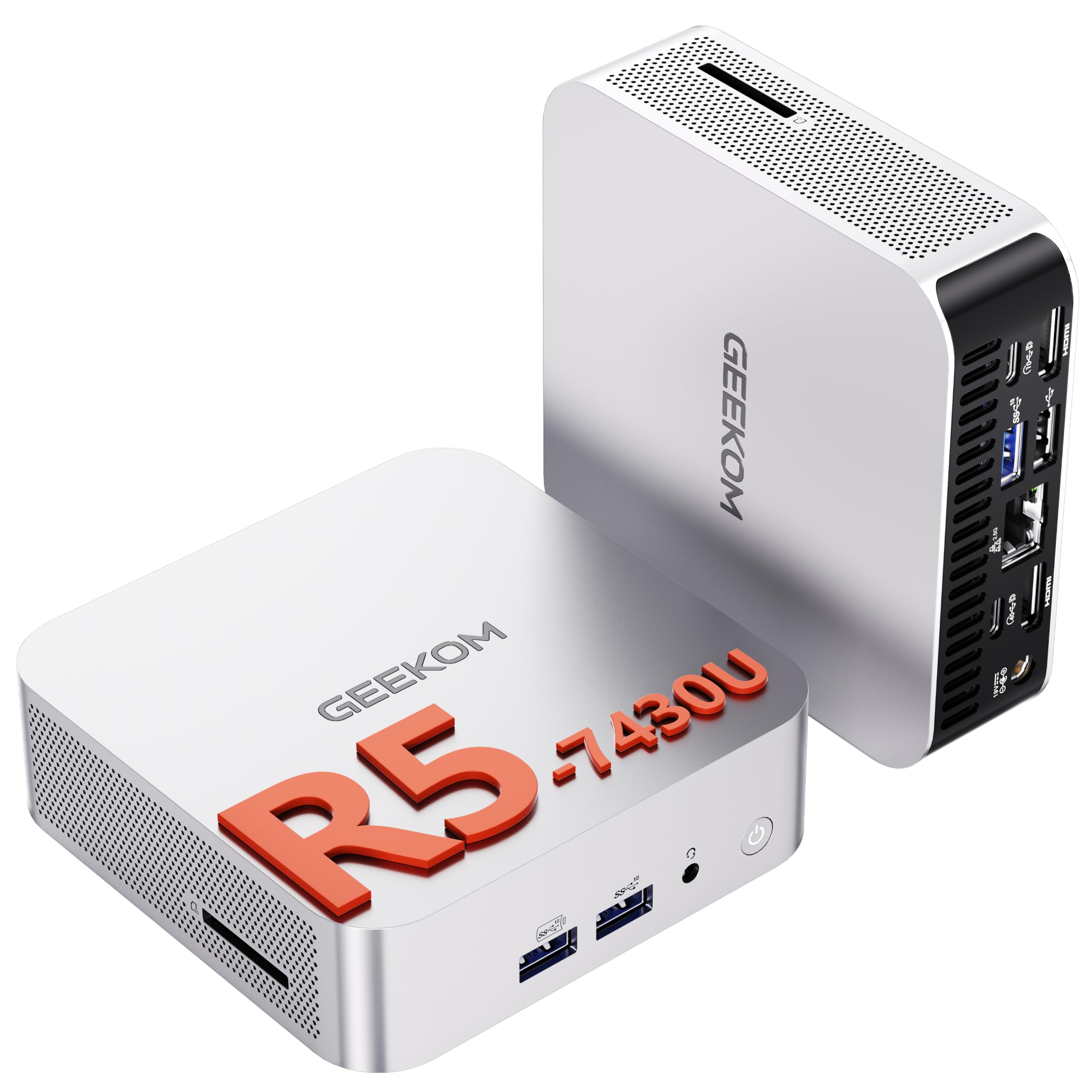
GEEKOM [2026 The Best Mini PC A5 PRO Mini PC Windows 11 Pro,with AMD Ryzen 5 7430U(Up to 4.4GHz) 16GB RAM & 512GB(Upgradable) SSD,Dual HDMI Quad Display/WIFI 6/6×USB for Video Editing/Graphic Design
Our Recommendation
The GEEKOM A5 PRO is the clear recommendation because it delivers dramatically better performance with the Ryzen 5 7430U, includes 16GB RAM and a 512GB SSD, and comes ready for modern use with Windows 11 Pro. It also has stronger connectivity, including WiFi 6, dual HDMI, quad-display support, and six USB ports. The Intel NUC6CAYH is cheaper, but once you factor in its older Celeron J3455 and barebone nature, it is poor value for most buyers. If you want a mini PC that feels fast and useful today, the GEEKOM wins easily.
Detailed Comparison
Display
Neither product includes a display, so screen quality is determined by the monitor you pair with it. That said, the GEEKOM A5 PRO wins here because it supports dual HDMI and quad-display output, making it far easier to run modern high-resolution monitors for productivity, editing timelines, or a multi-window workspace. The Intel NUC6CAYH is much more limited and is designed for basic display output rather than a flexible multi-monitor setup. Winner: GEEKOM A5 PRO.
Performance
This is the biggest difference by a wide margin. The Intel NUC6CAYH uses the Celeron J3455, a low-power quad-core chip from an older era that is fine for web browsing, office documents, and simple media playback, but it will feel slow with modern Windows tasks, lots of browser tabs, or any serious multitasking. The GEEKOM A5 PRO’s AMD Ryzen 5 7430U is in a completely different class: up to 4.4GHz, 16GB RAM, and a 512GB SSD give it far better responsiveness, faster app launches, and much stronger headroom for video editing, photo work, and heavier general use. If you want a machine that still feels quick in 2026 and beyond, the Ryzen system is the clear winner. Winner: GEEKOM A5 PRO.
Build quality and design
The Intel NUC line has a reputation for compact, tidy engineering, and the NUC6CAYH is a small barebone kit that can be attractive if you like building your own system from scratch. However, it is an older platform and the barebone nature means you still need to add storage and memory, which complicates the value proposition. The GEEKOM A5 PRO is a more complete out-of-box package with Windows 11 Pro, RAM, and SSD included, and its modern mini PC design is aimed at plug-and-play use. For most buyers, the GEEKOM feels like the more polished and practical product. Winner: GEEKOM A5 PRO.
Battery life
Neither of these is a battery-powered device, so this category does not really apply in the way it would for a laptop. In practical terms, the Intel’s lower-power Celeron platform will usually consume less electricity under light loads, which may matter if it is running 24/7 as a simple home server or always-on media box. But because the GEEKOM is far more capable, it delivers much more useful performance per pound spent, even if its power draw is higher. If you are thinking about energy efficiency alone, the Intel has a small edge; if you are thinking about overall usefulness, the GEEKOM is better. Winner: Intel NUC6CAYH for power efficiency only, but overall this category is effectively a tie.
Price and value for money
At £245, the Intel NUC6CAYH is £184 cheaper than the GEEKOM A5 PRO, but that lower price is misleading because it is a barebone kit built around an ageing Celeron J3455. Once you add RAM and storage, the real cost rises, and you still end up with a much slower system. The GEEKOM costs £429, but it includes 16GB RAM, a 512GB SSD, Windows 11 Pro, WiFi 6, and six USB ports, so it is far closer to a ready-to-use solution. For anyone who values performance and convenience, the GEEKOM offers much better value despite the higher sticker price. Winner: GEEKOM A5 PRO.
Game library/features
If by game library you mean gaming capability and modern features, the GEEKOM wins decisively. The Ryzen 5 7430U with integrated Radeon graphics is suitable for light gaming, indie titles, older esports games, and cloud gaming, while also supporting better multimedia acceleration and broader modern software compatibility. The Intel Celeron J3455 is not a gaming-focused chip and is really only suitable for very light casual titles or basic retro emulation. The GEEKOM also has the stronger feature set overall, with WiFi 6, dual HDMI, quad display support, and six USB ports, which makes it much more versatile for peripherals and multi-use setups. Winner: GEEKOM A5 PRO.
Overall user experience
The Intel NUC6CAYH makes sense only if your needs are extremely modest and you want the cheapest possible Intel-branded mini PC platform to tinker with. For everyone else, the experience will be limited by the old Celeron processor, the barebone setup, and the lack of modern headroom. The GEEKOM A5 PRO is the better day-to-day machine because it is faster, more complete, and more future-proof, with enough performance for productivity, content creation, and general home use without feeling dated. In short, the Intel is a budget relic, while the GEEKOM is a genuinely modern mini PC. Overall summary: buy the GEEKOM A5 PRO unless your only priority is spending the absolute minimum and you are happy with very basic performance.
Buy the Intel NUC6CAYH NUC if...
Buy Product A only if your budget is tightly capped and you specifically want the lowest-cost Intel mini PC platform to build around. It can suit very light tasks such as basic web browsing, simple office work, or a low-demand always-on system where performance is not important. Just be aware that the barebone kit means you will still need to add memory and storage.
Buy the GEEKOM [2026 The if...
Buy Product B if you want a mini PC for everyday Windows use, multiple monitors, light creative work, or occasional gaming. It is the better choice for anyone who wants a complete, modern system with much stronger speed, better expandability, and far less compromise. It is also the safer long-term buy if you do not want to outgrow the machine quickly.
Curated by Home Server Hub on All The Top Picks
As an Amazon Associate we earn from qualifying purchases.